



Did you know that 58% of global eCommerce sales come from mobile devices?
This makes selecting between WooCommerce vs Shopify a vital decision.
These platforms dominate the market, with Shopify leading at 28.8% market share and WooCommerce following at 18.2%.

Many business owners want to know what makes these platforms stand out. Shopify powers approximately 4.82 million stores and runs on an all-in-one hosted platform that emphasizes simplicity and scalability.
WooCommerce powers about 4.6 million active stores using its self-hosted WordPress plugin system.
The best platform choice for your business through 2026 depends on several factors. Your technical skills, budget, customization needs, and growth goals will guide this choice.
Shopify might be your best option if you need a complete package where it manages hosting and SSL certificates.
WooCommerce is the logical choice when you prioritize unlimited customization and cost management.This piece explores WooCommerce and Shopify. It looks at their setup processes, design options, core features, SEO tools, and pricing.
Our analysis will help you select the right platform to build a successful online store that grows beyond 2026.
Trying to build an eCommerce website but don’t know where to start? Let us help.
Shopify vs WooCommerce Basics
The eCommerce platform niche in 2026 is changing. Businesses need to understand the key differences between top platforms.
WooCommerce vs Shopify comparisons are by far the most popular and lead the way in shaping how companies build their online presence.
What is Shopify, and who is it for?
Shopify is an all-in-one eCommerce platform. It helps businesses create online stores easily, even without tech skills. This hosted solution powers approximately 4.5% of all websites on the internet.
More than 644 million shoppers worldwide use it.
A Shopify subscription has everything you need. It includes hosting, security, and essential eCommerce features all in one package.

The platform works best for entrepreneurs who want speed and simplicity. Store owners love Shopify’s step-by-step setup and accessible interface.
Even complete beginners can manage their stores with ease. Subscription plans start at $29 monthly for the basic plan, $79 for the mid-tier plan, and $299 for the advanced plan.
Shopify suits businesses that want fixed costs without technical hassles. Its structured setup helps entrepreneurs running side businesses or those who need to launch quickly.
Larger companies often pick Shopify Plus for its enterprise-level solutions.
What is WooCommerce and who should use it?
WooCommerce is a free, open-source plugin that turns WordPress websites into full-featured online stores. This powerful tool powers 9.2% of all websites on the internet. It has grown to over 8 million users.
WooCommerce builds on WordPress, which runs 43.5% of the internet. Users get access to countless themes and plugins.
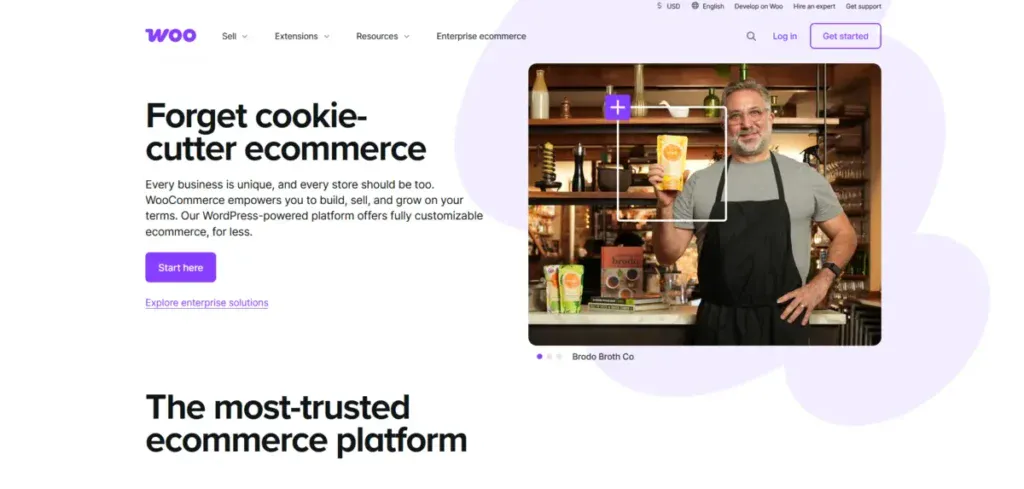
Businesses that need full control and customization love this platform. Store owners already using WordPress find WooCommerce fits right in.
You can modify everything thanks to its open-source nature. This makes it perfect for businesses with unique selling methods.
Budget-conscious entrepreneurs choose WooCommerce for its flexible pricing. The plugin costs nothing, but you need domain registration ($15/year) and hosting ($10-$50/month). This lets businesses spend based on their needs instead of picking preset packages.
WordPress WooCommerce vs Shopify: Key differences in setup
These platforms differ most in their setup process. Shopify handles all technical details for you. You can build a working store in minutes with its accessible onboarding.
This works great for people who value time over technical control.
WooCommerce takes more work to set up. Users must create a WordPress site, get hosting, install the plugin, and adjust settings. This extra effort gives you more control over your store. Tech-savvy users find this investment worthwhile for the customization options.
Technical complexity is another big difference. Shopify uses its own Liquid language for theme changes, so developers must learn this system. WooCommerce uses common web technologies that many developers understand.
However, you need to manage hosting and security updates on your own.
Choose between WooCommerce and Shopify based on your tech skills, customization needs, and business goals.
Ease of Use and Setup Time
Building an online store means finding the right balance between technical control and ease of use.
Platforms differ greatly in setup time and user-friendliness. These factors play a crucial role when merchants choose their platforms.
Original setup: Hosted vs self-hosted platforms
Shopify vs WooCommerce comparisons differ mainly in how they handle hosting. Shopify takes care of everything, meaning you won’t have to deal with servers, security certificates, or technical setup.
A new Shopify store launches 41% faster than a WooCommerce store. You’ll find a simple step-by-step process after signup that helps you add details, pick themes, and set up features.
In stark comparison to this, you’ll just need more hands-on work with WooCommerce as a self-hosted platform.
Here’s what you’ll do before adding products:
- Purchase domain registration.
- Select and configure hosting.
- Install WordPress.
- Add the WooCommerce plugin.
- Configure security settings.
This setup gives you total control, but takes longer. Store owners who are new to tech often struggle with these first steps.
User interface and dashboard experience
Shopify puts store management front and center in its dashboard. Products sit right at the second menu option, making stock management easy to reach.
The user-friendly layout organizes store elements logically. Everything you’ll need fits neatly into one dashboard.
WooCommerce lives inside WordPress. Rather than having its own space, it blends into the WordPress dashboard.
Product creation feels like writing blog posts, with extra options added. WordPress veterans love this setup, but newcomers might feel lost.
Each platform helps you create products differently. Shopify asks you to add products before picking a template.
This makes sense since you can edit listings and create variants during setup. WooCommerce wants you to set up themes, extensions, and technical parts first.
Explore how we reduced C.A.S.E’s bounce rate by 35% with a brand new website in our latest case study.
Learning curve for beginners
The learning curve matters a lot for merchants without tech skills. Shopify works great for beginners who want to start quickly. The dashboard layout makes sense right away.
When you need help, Shopify’s support team is there 24/7 through live chat, phone, and email.
WooCommerce gives you freedom but takes more time to learn. You get full code access but you’ll need some tech knowledge.
People who know WordPress pick it up fast. Complex changes might mean learning web tech or hiring help.
Shopify shines in its simplicity, you can focus on growing your business instead of managing tech stuff.
WooCommerce lets you customize everything but leaves you in charge of security, updates, and maintenance. Your choice comes down to what matters more: ease of use or complete control.
Design and Customization Flexibility
Your online store’s look and functionality can determine your business success.
The design tools and customization options let you create your brand’s unique online identity.
Theme availability: 70+ Shopify vs 1000s of WooCommerce themes
Shopify comes with approximately 200+ professionally designed themes, including 13 free options.
New store owners should consider that paid themes cost between $100 and $500. These themes shine on mobile devices. They include features like mega menus, quick views, and stock counters. These tools enhance the shopping experience.
The WordPress theme ecosystem gives WooCommerce users endless possibilities. You’ll find over 13,000 free options in the WordPress Theme Directory and hundreds of WooCommerce-specific themes.
Premium WooCommerce themes cost between $47 and $129, making them more affordable than Shopify themes.
The main difference goes deeper than numbers. Shopify focuses on curated, consistent themes that work right away. WooCommerce gives you a blank slate to build your storefront exactly how you want it.
This shows each platform’s philosophy. Shopify guides you, while WooCommerce lets your creativity run wild.
Customization options: Drag-and-drop vs full code access
Shopify’s editor uses a straightforward drag-and-drop interface with ready-made structures and sections. This helps non-technical users customize their stores without coding.
More advanced changes require learning Shopify’s Liquid templating language, which adds complexity for developers.
WooCommerce lets you customize everything. Advanced users can change every part of their storefront with PHP, HTML, CSS, and JavaScript.
Popular page builders like Breakdance, Elementor, and Divi expand WooCommerce’s capabilities.
These tools help you create unique product pages and checkout processes without writing code.
Shopify’s closed-source system limits your options, while WooCommerce’s open-source nature removes all restrictions.
Third-party plugin and app ecosystem
Both platforms offer extensive add-on marketplaces with different approaches to pricing and setup.
Shopify’s App Store contains over 8,000 apps that install easily without coding. These apps handle everything from email marketing to reviews and loyalty programs.
The catch?
Most apps need monthly subscriptions between $10 to $200, which adds up quickly.
WooCommerce offers thousands of extensions through its marketplace and WordPress plugins. Popular premium options include WooCommerce Subscriptions, Bookings, and Memberships. WooCommerce plugins often require one-time purchases or yearly licenses, unlike Shopify’s monthly fees. This can save you money over time.
WooCommerce shines with its mix-and-match approach. You only pay for what you need.
This saves money on unnecessary features that come with higher-tier plans, a common Shopify complaint. Developers can also modify existing plugins or create new ones, something Shopify doesn’t allow.
Businesses needing extensive customization or unique selling processes will find WooCommerce more flexible.
Shops that like simplicity may choose Shopify’s curated approach. It has limits and higher costs, but it can be worth it.
eCommerce Features and Integrations
The features and integration capabilities of eCommerce platforms go beyond simple functionality. They play a key role in determining which platform works best for your business needs.
You’ll see clear differences when comparing WooCommerce vs Shopify. This is especially true when you check their tools and how they connect with other services.
Built-in tools: Shopify’s all-in-one suite vs WooCommerce’s modular approach
Shopify uses an all-inclusive approach with detailed sales features built right into the platform. Its inventory tools work great for managing large catalogs, which makes it a good fit for stores with big product lines.
The platform has stock tracking, fraud protection, and abandoned cart recovery ready to use without extra setup.
WooCommerce takes a different route with its modular design. The core plugin has basic features like stock tracking and product variations.
For advanced features, you’ll need separate extensions. Store owners can pick only the tools they need and avoid paying for extras they won’t use.
This key difference shows each platform’s core philosophy.
Shopify’s integrated dashboard creates an environment where all tools combine smoothly. WooCommerce gives merchants the freedom to build a custom toolkit that matches their exact needs.
Multichannel selling: Facebook, Amazon, eBay integrations
Today’s eCommerce runs on multiple sales channels.
Shopify Plus connects businesses to major marketplaces through built-in integrations for Amazon, eBay, Facebook Shop, Instagram Shopping, Google Shopping, and Pinterest.
These connections manage inventory levels, product details, and pricing updates. They do this automatically from one dashboard.
WooCommerce works with major U.S. marketplaces like Amazon, eBay, Walmart, and Etsy through extensions.
Each platform handles multichannel management differently. Shopify’s Channel Manager comes with built-in tools to sync inventory across platforms.
WooCommerce needs third-party tools like Multichannel for WooCommerce by CedCommerce or ExportYourStore to do the same thing. These tools help you import products automatically. You can sync marketplaces with just one click.
Also, you can monitor quantities across all channels.
Dropshipping support: Oberlo vs AliDropship and others
The dropshipping world changed when Oberlo, Shopify’s main dropshipping solution, closed down.
Before it closed, Oberlo focused solely on Shopify stores. It provided features such as one-click AliExpress imports, automatic inventory updates, and bulk order fulfillment.
WooCommerce store owners now use AliDropship for similar features. Instead of monthly payments like Oberlo, AliDropship costs $89 once for lifetime access. It has extra features that Oberlo doesn’t have, such as automatic order tracking and a tool to import product reviews from AliExpress.
These tools reflect their platforms’ different approaches. Oberlo keeps things simple and works seamlessly with Shopify.
In contrast, AliDropship offers WooCommerce users more ways to customize. AliDropship made Sellvia for quicker shipping. It helps North American dropshippers connect with local suppliers for $39 a month.
Your sales strategy might help you choose between platforms. Shopify is great for managing large inventories. It offers affordable shipping labels with Shopify Shipping.
Plus, it simplifies payment processing using Shopify Payments. WooCommerce is great for businesses that want full control.
This is especially true for those selling physical products, digital downloads, and subscription services together.
You’ll need to decide if you want Shopify’s integrated system or WooCommerce’s freedom to pick specific tools for your business.
WooCommerce vs Shopify SEO – Performance
Search visibility determines an online store’s success. 53% of visitors abandon websites that take longer than three seconds to load.
WooCommerce vs Shopify both approach SEO in different ways. This impacts your store’s search rankings and user experience.
SEO tools: Yoast SEO vs built-in Shopify SEO apps
WooCommerce gets a major advantage through WordPress integration and offers exceptional SEO capabilities through plugins like Yoast SEO. This powerful tool gives you real-time content analysis.
You can optimize product descriptions, meta tags, and blog posts as you create them. You can manage keyword placement and readability scores with Yoast.
Shopify offers key SEO features. It can automatically generate sitemaps and lets you customize title tags. The platform makes optimization easy with its user-friendly interface.
However, it does have limits on URL structures and creating subcategories. Merchants seeking advanced tools can explore the Shopify App Store. They can use SEO Manager for automated audits and SEOAnt for AI-driven optimization.
The main difference comes down to control versus convenience.
WooCommerce’s open-source nature makes it perfect for stores with content-heavy marketing strategies. Shopify makes basic optimization easy.
However, it limits deep customization. This can frustrate technical SEO experts.
Learn how we increased Good Food’s page views per session by 99% with a brand new website in our most recent case study.
Page speed and performance optimization
Shopify stands out in speed optimization through its eCommerce-optimized infrastructure. Your store gets these automatic benefits:
- Worldwide CDN that caches content instantly.
- Server architecture designed to handle traffic spikes.
- Automatic system updates to maintain performance.
These built-in advantages help Shopify stores load quickly without technical intervention, giving them a natural edge in Core Web Vitals, a confirmed Google ranking factor.
WooCommerce’s performance depends on your hosting environment and optimization efforts. A well-set-up WooCommerce store can match or even beat Shopify’s speeds.
However, it requires active management. You must choose quality hosting, implement caching solutions, and optimize images yourself. This responsibility creates both risk and opportunity. Poorly optimized WooCommerce stores load slowly.
In contrast, well-configured ones perform exceptionally.
Store owners face a crucial choice: Shopify’s “done-for-you” approach or WooCommerce’s customizable, but maintenance-heavy solution?
Mobile responsiveness and Core Web Vitals
Mobile optimization shapes user experience and search rankings.
Over 60% of web traffic now comes from mobile devices as of January 2023. Google has confirmed that sites not optimized for mobile won’t rank well in mobile searches.
Shopify themes are made for mobile devices. They work well right away and perform consistently on all screen sizes. This out-of-the-box responsiveness means your store meets a key ranking factor automatically.
The platform’s infrastructure keeps strong Core Web Vitals scores. These scores assess loading speed, interactivity, and visual stability.
WooCommerce’s responsiveness changes based on theme selection and customization. Many WordPress themes need extra configuration to work well on mobile devices. Using a trusted WooCommerce theme can help reduce this issue.
However, you still need to test and optimize the mobile experience on your own.
Your technical capabilities determine the performance outcome. Shopify creates an easier path to SEO success for non-technical merchants by handling infrastructure and technical optimization automatically.
WooCommerce offers great results for those willing to invest in optimization. Its unlimited customization and strong extensions, like Yoast SEO, make a big difference.
Your choice should match your technical comfort level and SEO strategy.
WooCommerce offers great blogging tools and full control over on-page elements. This gives it an edge if you focus on content marketing.
Shopify’s automated optimization works better for those focused on product-led growth.
WooCommerce vs Shopify – Pricing & Long-Term Costs
Store owners often choose their platform based on price. WooCommerce vs Shopify cost differences tell only part of the story that unfolds over time.
Monthly fees: Shopify plans vs WooCommerce hosting
Shopify offers clear-cut monthly pricing tiers: Basic Shopify at $29, Standard Shopify at $79, and Advanced Shopify at $299 per month.
You’ll get more features as you move up. Professional reports come with the $79 plan, and you’ll need the $299 plan for advanced shipping calculations.
WooCommerce takes a different path. This free WordPress plugin needs separate hosting. Good WooCommerce hosting costs between $20-200 monthly based on your traffic and performance needs.
Beginners can start with shared hosting at $5-10 monthly, while busy stores need dedicated hosting at $100-500+ monthly.
You’ll pay less to start, but costs can vary as your store grows.
Each platform shows its values in its pricing: Shopify spreads costs through steady subscriptions, while WooCommerce asks for more upfront but gives you control.
Transaction fees and payment gateways
Payment processing fees work differently on both platforms. Shopify charges 2.9% + $0.30 per transaction with Shopify Payments.
If you use another payment processor, Shopify adds extra fees – 2% (Basic), 1% (Standard), or 0.5% (Advanced) on top of your processor’s fees.
Here’s what this means: a Basic Shopify store making $50,000 monthly with an external payment processor could pay $1,000+ in Shopify transaction fees alone, not counting processor fees and monthly plans.
WooCommerce lets you use any payment gateway without extra fees. Their WooPayments start at 2.9% + $0.30 per transaction, similar to Shopify’s Basic plan.
Hidden costs: Plugins, themes, and developer support
The real cost difference shows up in day-to-day operations. Shopify stores typically need several paid apps for core features. Email marketing ($20-100/month), advanced analytics ($15-50/month), and inventory management ($30-200/month) can add $100-500 to your monthly costs.
WooCommerce brings different expenses: domain names ($10-20/year), SSL certificates (usually included with hosting), premium themes ($50-100 one-time), and extension plugins.
Most WooCommerce plugins offer one-time purchases or yearly licenses. This can save money over time.
Technical upkeep is another big cost factor. Shopify manages all technical details, but WooCommerce needs regular maintenance. You might need to hire a developer ($50-200 monthly) or spend time on security updates and optimization if you lack technical skills.
Your business profile determines which platform offers better value. WooCommerce usually costs less for high-volume merchants since it doesn’t take a cut of sales.
Small businesses with limited tech knowledge might find Shopify’s all-in-one approach more budget-friendly, even with higher monthly fees.
Get a Custom eCommerce Website That Converts With Blacksmith
Choosing between WooCommerce and Shopify boils down to balancing control against convenience.
Your business needs, tech comfort, and future plans will guide you in choosing the right platform.
No matter which option you choose, both will need your time. You’ll have to work on building and personalizing your eCommerce store until it’s just right. This is something that could take weeks or even months, depending on how detailed and in-depth you want to be.
This is time you could be using on other aspects of your business that are also important and deserve your attention.
So now what?
That’s where we come in. Blacksmith is a professional web development agency that offers:
Depending on your needs, our web developers can create either a Shopify or WooCommerce eCommerce website to suit your needs.
Still unsure if a brand-new eCommerce store is what your brand needs to grow?
Don’t worry, click here to schedule a call with us and we’ll provide you with a free brand and website audit. This way, we can show the areas where your brand might be losing out on sales by not having an optimized eCommerce store and what we can do to fix it.