




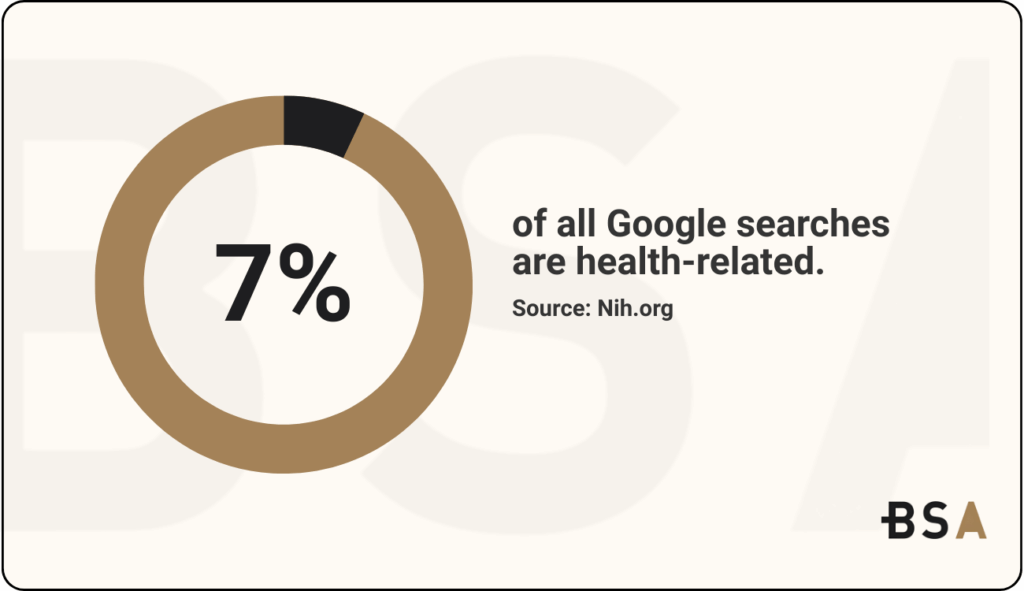
Your medical practice’s website design could be driving patients away. Research shows that approximately 7% of all Google searches are health-related. This means that having an amazing-looking healthcare website that brings patients in is vital in 2026.
A healthcare website must do more than look good; it should create digital experiences that bring in new patients, boost engagement, and strengthen brand recognition.
We’ve tested and compiled 17 proven strategies in this article to help turn basic medical websites into powerful patient magnets. These strategies include user-friendly navigation that helps users find what they need. They also feature design elements that build trust.
Trying to improve your healthcare website, but don’t know where to start? Let us help.
1. Define Your Website’s Purpose
A clear purpose sets the foundation for every successful medical website. Your website’s existence should have concrete goals that match your practice’s business objectives. Simply making a website because others have one isn’t enough.
The Purpose of Defining Website Goals
Starting a website design project without goals is like building a hospital without knowing what it treats. Your website could educate patients about conditions, generate appointments, or give access to medical records. Each of these needs different design features.
Clear website goals help you:
- Choose which features matter most.
- Use development resources wisely.
- Track success after launch.
How it Affects Healthcare Web Design
Your website’s purpose makes design decisions easier. A primary care practice that wants fewer phone calls by moving appointments online shows this well. This goal shapes the homepage layout and navigation structure.
The website’s purpose shapes:
- How content gets arranged.
- Where calls-to-action go.
- Patient paths through the site.
- Which technology to use.
A patient education site needs good content management tools. An appointment-focused site must integrate well with scheduling software.
2. Know Your Target Audience
Healthcare websites that put patients first emerge from a deep understanding of their users. Medical practices succeed when they create digital experiences customized to specific audience needs.
Understanding Patient Personas
Patient personas embody distinct groups within your target audience. These profiles show the unique needs, priorities, and behaviors of different patient types. Recent data show that 56% of companies have generated higher-quality leads using personas.
Patient personas offer multiple benefits:
- Build meaningful connections through personal messages.
- Allocate resources effectively toward high-priority segments.
- Increase participation with content that appeals.
- Streamline processes by arranging services with expectations.
Effective personas need demographic data, medical history, communication priorities, and online behaviors. Each persona should have a name and a backstory to make them real.
Tailoring Design to User Needs
Patient personas provide valuable insights to customize your healthcare website design. Different patient groups have their own priorities. Some want educational resources. Others prefer quick appointment booking. Many need both.
A user-friendly layout helps patients find what they need quickly. Clear headings, logical menus, and prominent search features direct users through your site smoothly.
Simple language makes a difference. Medical jargon should give way to clear terminology that helps visitors feel understood. Your website design for a medical practice must be accessible to everyone, regardless of their ability to use your content.
3. Ensure Mobile Responsiveness
Smartphones and tablets generate over 64% of all website visits. Healthcare organizations need to focus on this trend. Patients use mobile devices to find care, schedule appointments, and access medical info.
Why Mobile-First Matters in Healthcare
Patient expectations drive mobile optimization needs. 53% of mobile users will leave a site that takes more than three seconds to load.
Medical practices face crucial mobile challenges:
- People use smartphones to look up health information 58% of the time.
- Sites optimized for mobile devices see 27% higher customer engagement.
Poor mobile experience damages your reputation beyond just frustrating visitors.
Responsive Design Techniques
Your healthcare website can adjust automatically to any screen size through responsive design. This method relies on:
- Fluid grids that scale content proportionally
- Flexible images that maintain quality when resized
- Media queries that detect viewport dimensions
- Navigation with larger, touch-friendly buttons
- Font sizes that users can read without zooming
- Content that adapts to smaller screens
Google prefers true responsive design over older “mobile-friendly” approaches that created separate sites. This design naturally adapts to different devices.
Tools to Test Responsiveness
Your healthcare website’s performance can be verified through several tools:
Google’s DevTools Device Mode lets you test touch events, screen orientation, and resolution settings right in your browser. BrowserStack offers testing on more than 1,000 real mobile devices.
Responsinator helps visualize your site on popular devices quickly, while Google’s PageSpeed Insights analyzes performance thoroughly.
Note that responsive testing requires ongoing attention. New devices with various screen sizes appear all the time. Ongoing testing is key to providing the best patient experiences on your healthcare website.
4. Design for Accessibility (ADA Compliance)
About 61 million Americans live with disabilities. This makes accessibility crucial when designing healthcare websites. Healthcare providers who ignore accessibility risk excluding patients and face legal issues.
What ADA Compliance Means
The Americans with Disabilities Act of 1990 set up ADA compliance. This helps stop discrimination against people with disabilities. Healthcare websites must follow Web Content Accessibility Guidelines (WCAG) standards. The Department of Health and Human Services (HHS) now requires WCAG 2.1 Level AA compliance.

Recent regulatory updates impact healthcare providers that get federal funds from Medicare and Medicaid. Organizations with 15+ employees must comply by May 11, 2026. Smaller practices have until May 10, 2027. These changes represent the first major update to Section 504 of the Rehabilitation Act in almost fifty years.
Accessibility Features to Include
Your healthcare website needs these key elements to be ADA-compliant:
- Text alternatives: Add alt text for images, captions for videos, and transcripts for audio content
- Color accessibility: Ensure sufficient contrast ratios (4.5:1) and avoid using color alone to convey information
- Keyboard navigation: Make your site navigable without a mouse
- Form accessibility: Include clear labels, instructions, and error messages
- Proper structure: Use semantic HTML with appropriate headings and navigation
Remember, 80% of leading U.S. hospital websites don’t meet recommended accessibility standards. Your medical practice can excel by making accessibility a priority.
5. Create Accessible Interface Navigation
A well-designed navigation system works like a hospital’s signage system. Your healthcare website should be well-organized. This helps patients find information fast and easily.
Navigation Best Practices
Your healthcare website navigation needs a logical structure. The main menu should have 5-7 key items, including Services, About Us, Patient Resources, Locations, and Contact. Specialized practices need subcategories under each specialty. This prevents visitors from feeling overwhelmed with too many choices.
Your calls-to-action should grab attention through:
- Colors that stand out from your site’s design
- Clear text like “Book an Appointment.”
- Strategic placement in main navigation
Your logo needs a fixed spot on every page. It should take visitors back to the homepage when clicked. This simple feature lets people restart their search from any page.
How to Test Usability
Real users show how well your navigation works through usability testing. A/B testing helps you compare different design options. Card sorting shows the best way to organize content based on user priorities.
Heat mapping shows exactly where users click and scroll before leaving pages. Simple “paper prototypes” help test navigation flows before you start coding.
Focus groups and surveys help you learn about structure and design preferences. The best insights come from watching users complete actual tasks on your site.
6. Incorporate Strong Visual Hierarchy
Visual hierarchy is vital for healthcare website design. It guides visitors’ attention to the most important elements on your page.
What is Visual Hierarchy?
Visual hierarchy shows how elements are arranged by importance. The human brain processes information as a whole, according to Gestalt theory. Users find it hard to identify important information when the hierarchy is flat.
This principle helps patients find important details fast when they need urgent medical info.
Using Color, Size, and Layout Effectively
Colors shape how patients experience your site. Blues and greens help reduce anxiety with their calming effects. Yellow and orange add warmth and friendliness to clinic information areas. High-contrast call-to-action buttons boost appointment requests by 28%.
Larger elements naturally catch the eye first. Your main buttons, like “Find a Doctor,” need to stand out visually.
The layout should group related information through:
- Proximity and similarity principles that work together
- White space that highlights content groups
- Headings that follow clear patterns
Impact on User Engagement
Patient conversion rates depend on a strong visual hierarchy. Healthcare websites contain more content than other industries. A good organization stops users from getting lost.
Visual design helps build trust. It guides patients to important information and makes the site easy for everyone to use. Good visual hierarchy helps patients understand complex health data better. They can make decisions faster and connect with care more easily.
7. Use Patient-Centric Content
Patient-centric content prioritizes visitors’ needs. It answers their real questions instead of just broadcasting information. The focus stays on clarity, relevance, and empathy. Medical jargon gives way to information that patients can understand and use effectively.
How to Write for Healthcare Audiences
Most patients read at an 8th-grade level or below. Medical websites need clear, simple language that connects with readers. Plain terms are clearer than technical ones. For example, “heart attack” is easier to understand than “myocardial infarction.” Complex topics become easier to understand with descriptive subheadings.
These writing principles make a difference:
- Direct answers to common questions
- Step-by-step procedure explanations
- Pronunciation guides for complex terms
- Simple alternatives to medical terminology
Learn how we increased Deep 6’s conversion rate by 32% with a new web design in our latest case study.
8. Implement Secure Patient Portals
Patient portals began as small projects. They have now become vital to healthcare’s digital strategy. These secure online systems now serve as the main way patients access timely healthcare.
Features of a Good Patient Portal
Modern patient portals provide several helpful features:
- Secure messaging between patients and providers
- Access to test results with visual aids like charts and graphs
- Appointment scheduling and management
- Prescription renewal capabilities
- Bill payment and financial history access
A well-designed portal shows lab results in a clear format that reduces patient calls about test results. The portal offers useful educational resources. It also helps patients manage chronic conditions, such as diabetes.
Security and HIPAA Compliance
HIPAA regulations require healthcare providers to protect patient information with reasonable measures. Patient portals need:
Administrative safeguards through risk assessment protocols, physical protections to limit unauthorized access, and technical controls like encryption and secure authentication

SSL certification will give you safe PHI transfer across the internet by changing your URL from HTTP to HTTPS.
9. Enable Online Appointment Scheduling
Online appointment scheduling revolutionizes patient-provider connections in healthcare. This feature is important. About 80% of healthcare consumers say that online scheduling affects which provider they choose.
Benefits of Online Scheduling
Online scheduling systems let patients book appointments 24/7 and free up the core team from phone duties. Patients appreciate the convenience, time savings, and automatic reminders these systems provide. Digital scheduling has shown remarkable results.
Designing a Smooth Booking Flow
A hassle-free booking experience requires:
- Prominent “Schedule Now” buttons on provider profiles and homepage.
- Direct scheduling without requiring a login first.
- Mobile-friendly interfaces that load quickly.
Medical websites are most effective when scheduling options are easy to find. Place them where patients naturally look. Use clear calls-to-action to increase conversions.
Reducing No-Shows and Wait Times
Healthcare systems struggle with no-shows, which average 23% across specialties. Practices using online scheduling see much better results: just 1.8% no-shows compared to 5.9% for traditional bookings.
SMS reminders automatically cut missed appointments by up to 40%. Patients can easily reschedule instead of missing appointments. This is why online bookings have a rescheduling rate of 29.8%, while traditional bookings sit at 12.9%.
10. Optimize for Speed and Performance
The loading speed of your website impacts how well you attract and keep patients for your medical practice. A fast website delivers better results for your business beyond just improving user experience.
Why speed matters in healthcare websites
Your practice’s first impression depends on website speed. Healthcare websites typically see bounce rates between 55-70%, and slow loading makes this worse.
The financial consequences are clear: a 1-second delay reduces conversions by 7%. A healthcare site with 1,000 daily visitors and a $300 average appointment value could lose up to $907,200 yearly due to slow loading.
Techniques to Improve Load Time
Image optimization should be your first step. Compress visuals while maintaining quality. Your site needs a mobile-first design. Most patients use mobile devices to access healthcare websites.
A Content Delivery Network (CDN) serves files from servers closer to users, making sites load faster. Browser caching helps returning visitors, while lazy loading loads images only when needed.
Better server configuration enhances speed. Upgrade to the HTTP/2 protocol and SSD hosting. Code minification eliminates unnecessary spaces and comments to create faster sites.
Tools to Measure Performance
GTmetrix runs speed tests and provides waterfall charts with suggestions for improvement. PageSpeed Insights by Google shows how speed affects search visibility and user experience.
Healthcare providers can use Pingdom and Site24x7 to track uptime, performance, and server health. Your site should load within three seconds on all devices.
Core Web Vitals is Google’s metric for loading, interactivity, and visual stability, and it plays a crucial role in search rankings.
11. Integrate Telehealth Functionality
Telehealth has become an important part of modern healthcare delivery. Patients now expect virtual care options from their providers. Telehealth offers fully digital healthcare services that extend beyond simple video consultations.
What Telehealth Features to Include
Medical websites should incorporate several essential telehealth components:
- HIPAA-compliant video functionality for secure patient-provider interactions
- Appointment scheduling with automated reminders to reduce no-shows
- Secure messaging for quick questions and follow-ups
- Electronic Health Records (EHR) integration allows immediate access during consultations
- Prescription management and e-prescribing capabilities
- Patient account management with proper identification verification
Design Considerations for Virtual Care
The primary rule for designing telehealth interfaces focuses on simplicity. Patients need FaceTime-simple experiences. Your homepage should display prominent “Start Telemedicine Visit” buttons. Telehealth systems must blend with computers, tablets, and smartphones.
Security stands paramount. End-to-end encryption and clear communication about HIPAA compliance build trust.
12. Add Multilingual Support
Healthcare quality and outcomes take a hit due to language barriers. Research shows over 41 million Americans speak Spanish, making it the most common non-English language in 47 states. More than 26 million people speak languages other than English or Spanish.
Why Multilingual Access Matters
Language barriers result in extended hospital stays, more readmissions, and worse clinical outcomes. Patients who struggle with English face health inequalities and uneven access to treatment.
Best Practices for Translation
Medical translation needs more than simple word swaps. Healthcare organizations should create central translation systems. This helps confirm needs and manage resources better. The task requires professional medical translators who understand healthcare.
Teams should create terminology guides and style manuals that keep content consistent. Reading levels should stay between fourth and sixth grade to help with health literacy.
Tools and Plugins to Use
Lokalise delivers enterprise-level security through SOC 2 Type II and ISO 27001/27017 certifications, with data encryption at rest and in transit. The platform lets translators, medical reviewers, and regulatory teams work in separate steps.
Google Translate and MediBabble provide free options that boost satisfaction for both medical staff and patients. Video remote interpretation keeps the visual elements that are vital for healthcare communication.
A medical website with multilingual support shows a strong commitment to health equity for all communities.
13. Use Trust-Building Elements
Trust elements on medical websites act as digital credibility signals that shape patient decisions before their first visit.
Importance of Social Proof
Patient testimonials substantially affect healthcare decisions. Patient trust is the foundation of healthcare decisions. People seeking care feel vulnerable and need reassurance.
Reviews matter more than just testimonials. Healthcare providers need at least five reviews to gain patient trust. Many practice websites still lack adequate social proof.
Where to Place Testimonials and Reviews
Smart placement of testimonials on your healthcare website design enhances their effectiveness:
- Homepage – Place testimonials near appointment booking buttons to boost conversions
- Service-specific pages – Add feedback about specific treatments
- Dedicated testimonials page – Build a central hub that showcases multiple patient experiences
Physical displays prove effective, too. Patient testimonial scrapbooks in reception areas become the most read material in waiting rooms.
Visual cues that build trust
Visual elements establish credibility before patients read your content. Well-planned white space shows respect for visitors’ attention. Real photos of your practice work better than stock images and show commitment to quality. Properly displayed credentials and certifications act as authority signals.

A consistent design across all channels shows organizational sophistication. This visual trust architecture builds lasting relationships beyond mere aesthetics.
14. Maintain Consistent Branding
Your healthcare organization’s DNA stems from a consistent brand identity; it defines who you are beyond just a logo or tagline.
What Makes a Strong Healthcare Brand
A powerful healthcare brand sets your practice apart in a crowded marketplace. Your brand’s position should show who you serve, the benefits you offer, and what makes you stand out from competitors. Medical practices need to show credibility, breakthroughs, safety, and value quickly. Your message becomes clearer with a dedicated focus on positioning.
Visual and Messaging Consistency
Trust grows through consistency. Mixed messages confuse. If your website shares one message, but your marketing materials highlight another, it can be unclear.
Your brand shows up in every touchpoint, from your website to your clinic’s signage. Your clinic’s professionalism shows in its visual elements. This includes consistent colors, fonts, and images. Leading healthcare websites maintain this visual harmony while staying dynamic.
15. Utilize SEO Best Practices
SEO enhances your medical practice website’s visibility in today’s digital world. Research shows that 72% of internet users look up health information online. Your site’s optimization plays a vital role in growing your practice.
SEO Basics for Healthcare Websites
Your journey begins with detailed keyword research. Focus on services (“knee pain treatment”), specialties (“dermatologist in Mesa”), and conditions (“high blood pressure care”). A well-laid-out website needs clear headings, descriptive meta tags, and a secure HTTPS protocol.
The secure protocol becomes essential when handling sensitive patient information. Your site must work well on mobile devices since more than 60% of healthcare searches occur on smartphones and tablets.
On-Page and Off-Page Strategies
On-page SEO requires professional medical content that meets Google’s E-E-A-T standards. Rankings depend on technical elements such as page speed, structured data, and accessibility.
Off-page strategies help build your site’s authority. You need quality backlinks from trusted healthcare sources, proper management of patient reviews, and accurate information across platforms like Healthgrades.
How SEO Improves Patient Acquisition
Hospital websites receive three times more visitors through online searches than through other channels. Smart SEO connects patients with your practice when they need care most and targets relevant local searches.
Higher search rankings build credibility that helps convert people looking for healthcare into actual patients.
Explore how we increased Cision’s total website users by 148% with a new web design in our most recent case study.
16. Track Performance With Analytics
Website performance analytics show what works, what doesn’t, and how improvements can lead to better patient participation. Healthcare websites need to track their metrics. They miss opportunities to improve user experience and increase conversions otherwise.
Why Analytics Matter
Web analytics measure how users interact with your site directly. The data gives you evidence-based information about visitor behavior. Healthcare organizations can achieve their goals through better communication by collecting and analyzing internet data systematically.
Medical practices can identify their strengths to magnify and address weaknesses through analytics. Your website becomes a digital waiting room where patients leave silently without explanation if you don’t measure properly.
Key Metrics to Monitor
These performance indicators are the foundations of good tracking:
Audience measurements: You should track unique visitors, sessions, and distinguish between new and returning visitors. Demographic analysis helps you learn about who visits your website.
Engagement metrics: The bounce rate (ideally 40-55%), pages per session, scroll depth, and time spent on pages need monitoring. Content might not be useful or meet expectations if bounce rates are high or session times are low.
Conversion tracking: The number of visitors taking desired actions, like appointment requests, may be your most important KPI.
Acquisition sources: Your marketing effectiveness becomes clear when you know how visitors find your site through search, referrals, email, or paid ads.
Using Data to Improve UX
Google Analytics offers detailed visitor tracking. Google Search Console helps analyze search performance. Hotjar shows user behavior through heatmaps that display where people click most often. Dynamic phone tracking helps identify which practice locations generate qualified calls.
Quick-win automated techniques work well with deeper research methods to test UX improvements. Navigation optimization becomes easier with tree testing. Users get tasks like “find a doctor” without visual distractions.
17. Keep Content Fresh and Updated
Your healthcare website’s content serves as the heartbeat of your digital presence. Medical knowledge constantly evolves, and your website must reflect the latest developments in your practice.
Why Regular Updates Are Essential
Fresh content helps patients stay connected throughout their healthcare experience. Google gives priority to pages with original content. Each update gives search engines a new reason to browse and index your pages.
Even small changes can boost your rankings. Visitors quickly lose trust when they see outdated content. Regular updates give patients reasons to come back and deepen their commitment to your brand.
Your medical website should paint an accurate picture of your organization today. Your website needs to showcase new treatment techniques, facility renovations, or new diagnostic equipment. Most websites need detailed updates after two years.
Content Audit Strategies
High-traffic areas deserve your first attention. Service line pages, location pages, and provider profiles attract the most visits. Good audits reveal what works, what doesn’t, and where content gaps exist. Leadership priorities, urgent issues, and quick wins should guide your update schedule.
Look for staff changes, outdated patient forms, new treatments, tech advances, and changed office hours. The core team should review content accuracy together. Remove old event details right away and add upcoming events early.
How to Plan a Content Calendar
Start your healthcare content calendar with clear goals. Use spreadsheets to track every content category on your site, including service lines and major content groups. Give team members specific roles: evaluation, strategy development, content creation, editing, publishing, and promotion.
Build your calendar around health events, awareness months, and seasonal topics. Tools like Trello, Asana, Google Calendar, or CoSchedule make calendar management easier. Schedule quarterly planning sessions to look 3-6 months ahead, but stay flexible. Blog content might need its own calendar with more frequent updates.
Get a Custom Healthcare Website Design That Converts With Blacksmith
These 17 design secrets can make or break your healthcare website’s success as your practice’s digital front door. A good medical website does more than just look nice; it brings in new patients, builds trust, and keeps them engaged.
You need a clear purpose and must understand your target audience to build a foundation that connects with patients’ needs.
But we won’t sugarcoat it. Building a stunning website design for medical practice takes a lot of work and planning. This is a project that can take you weeks or even months to complete. This is time you could be focusing on other important aspects of your healthcare business, so now what?
That’s where we come in. Blacksmith is a Healthcare Website Design Company with a group of web design professionals ready to create the perfect healthcare website for your business. From applying everything in this article to adding niche features and additions that will help your healthcare stand out.
Still unsure if getting a brand new website design for your healthcare company is the right choice? Don’t worry, schedule a call with us, and we’ll provide you with a complete website and brand audit. This way, we can show you the areas where a lack of optimization might be hurting your revenue a lot more than you would have thought.