





Designing a successful and effective website rarely starts with picking its colors, typography, or animations. It generally begins with structure. Before a web designer chooses a style or a developer writes a line of code, a team often creates wireframes.
If you’ve ever been curious about how modern websites achieve intuitive navigation and clear user journeys, the answer generally lies in well-structured wireframing.
In this guide, we will go through 20 wireframe examples that designers generally use when planning websites and applications.
Are you trying to improve your website, but don’t know where to start? Let us help.
What’s a Wireframe?
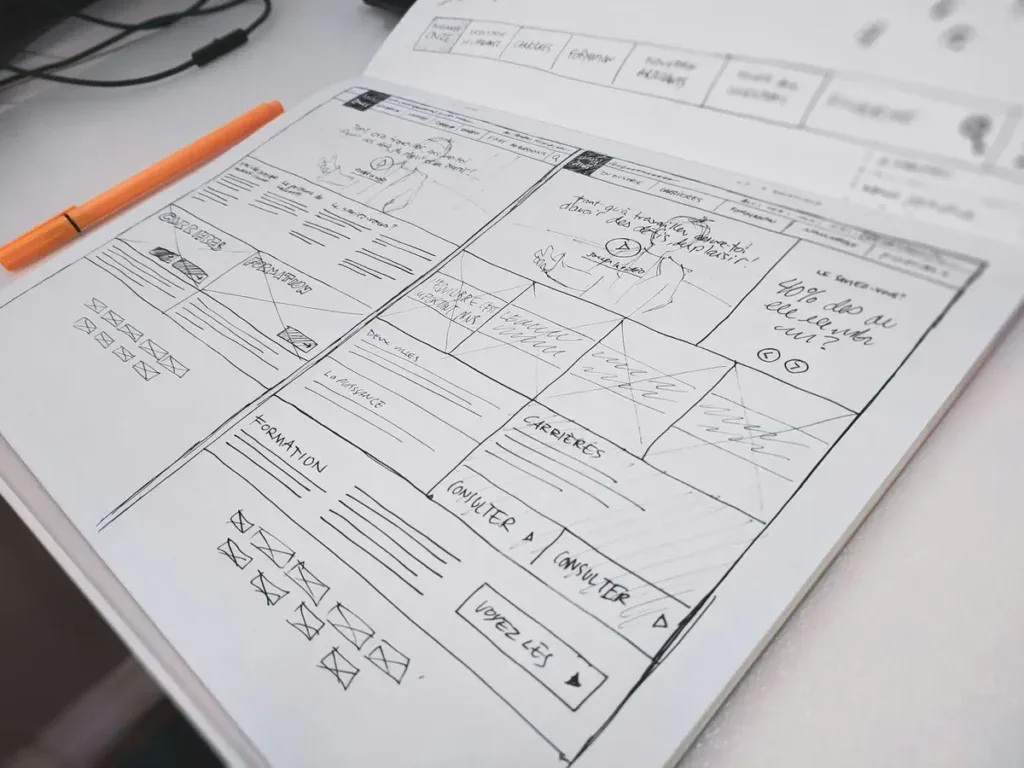
A wireframe is a simplified blueprint of a webpage or application interface. It focuses on layout, hierarchy, and functionality rather than visual design elements.
Instead of focusing on detailed graphics, wireframes generally use:
- Placeholder text
- Simple shapes
- Grayscale elements
- Basic layout blocks
The purpose is to answer structural questions as early as possible in the design process, such as:
- Where should navigation live?
- How does a user move through the page?
- Which content elements deserve the most attention?
By solving these questions first, teams reduce expensive redesigns later down the line.
Wireframes are generally split into three different fidelity levels.
Low-fidelity sketches are quick representations that show a rough layout of page structure and concepts.
Mid-fidelity wireframes begin to resemble the final product, depending on the stage of a project.
High-fidelity wireframes start to resemble the end product with refined spacing and interaction hints.
Understanding these levels can help designers pick the right approach for the situation and stage of the project they are in. That’s why knowing different wireframe examples is also vital when creating your own website.
Why Wireframes Matter in Modern UX Design
The importance of wireframing has increased significantly as websites have become more complex. Modern digital products need support for multiple screen sizes, specific navigation patterns, and sophisticated user journeys. Without clear structural planning, even beautiful designs can become confusing.
Wireframes help you accomplish several objectives.
First, it aligns a common vision early. Product managers, marketers, developers, and designers can all review and understand the structure before anything else starts.
Second, they dramatically reduce web development time. Adjusting layouts in a wireframe takes minutes at most, while redesigning a coded page can take days or weeks, depending on the complexity.
Third, they prioritize usability. Because wireframes remove visual distractions, teams can focus entirely on the user experience.
20 Wireframes Examples Designers Commonly Use
Below are 20 wireframe examples that represent common layouts used for modern websites and digital products alike.
These examples illustrate how different page types support different user goals.
1. Homepage Wireframe
The homepage wireframe focuses on guiding users toward key actions as fast as possible. Generally, a homepage wireframe includes a hero section, value proposition, navigation menu, and some featured content blocks that can be used for features.
A homepage wireframe generally begins with a top navigation bar containing the primary menu, logo placement, and sometimes a call-to-action button.
Right under should be the hero section, which includes a headline, supporting text, and a prominent CTA.
The middle sections of the homepage generally show your core services, product features, or value propositions. These blocks help visitors understand exactly what you’re selling and why they should care.
Near the bottom of the homepage wireframe, there are usually sections for additional navigation, newsletter sign-up forms, or quick links to popular pages.
The footer then anchors the layout with site-wide navigation, social media links, and any mandatory legal information.
The main goal of this wireframe isn’t visual beauty but a consistent and noticeable information hierarchy that ensures the most important message appears as quickly as possible for visitors and guides them deeper into the website.
This is by far one of the most important wireframe examples on this list due to its importance in any website.
2. Landing Page Wireframe
Landing pages are different from normal homepages because they focus on a single objective, which is selling a specific product or service.
In most landing page wireframe examples, the design removes any unnecessary navigation. By limiting distractions, the layout pushes visitors toward completing the intended action.
The top section generally includes a bold and catchy headline, supporting copy, and a prominent CTA. Designers typically include an illustrative image or product screenshot beside the text to provide context.
Further down the page, the wireframe usually includes a sequence of sections that gradually build trust.
First comes the brief explanation of the product or service. Then there should be a small benefit-oriented section that explains what problem the product or service is addressing. Social proof elements, like testimonials or customer logos, generally go right after to give credibility.
Toward the end of the page, the layout looks to reinforce the call-to-action with a final CTA block. This structure reflects a classic conversion funnel, guiding visitors from awareness to decision.
3. Product Page Wireframe
Product pages represent one of the most common wireframe examples in eCommerce design. Their main purpose is to provide as much necessary information as possible for users to make confident purchasing decisions.
The top section of the wireframe generally places a large product image gallery on the left side and the product details on the right or bottom. These details generally include the product name, price, availability, and an add-to-cart button.
Directly beneath this section, designers generally add tabs for additional information, such as specifications, shopping details, and customer reviews.
Another important element frequently seen in effective product wireframes is the related products section. This encourages additional browsing and increases average order value.
The biggest challenge that product page wireframes face is balancing visuals with information depth. Users need quick purchasing access while also having the option to explore detailed product information.
4. Blog Article Wireframe
Blog pages are designed to support long-form content while maintaining readability and engagement. Blog layouts are important because they influence how users interact with the content.
The top of the wireframe usually includes a featured image, article title, and author information. Beneath that lies the main content area, generally arranged in a single-column layout to improve readability.
Some designs can introduce a sidebar that also includes related articles, a newsletter subscription, or category navigation. However, modern UX trends increasingly go for a distraction-free reading experience instead.
Additional elements generally included in blog wireframes are:
- Table of contents
- Social sharing buttons
- Inline call-to-action sections
- Author bio
- Related content suggestions
All of these features help maintain engagement while supporting SEO goals. While it might not seem as vital, a blog article page is crucial and should be considered as one of the first wireframe examples to create when building a website from scratch.
5. Dashboard Wireframe
Dashboards are common in SaaS platforms and analytics tools. These wireframe examples focus on presenting information in a way that is easy to understand.
Dashboard layouts typically include a left-hand navigation panel that lets users switch between sections such as settings, integrations, and even other reports.
The main content area is organized into modular panels, each showing specific datasets, such as charts, metrics, or activity logs.
One of the biggest design challenges with dashboards is trying not to overcomplicate them. Wireframes help designers determine how much information should appear on one screen without overwhelming users.
Effective dashboards make good use of spacing, grouping, and visual hierarchy to guide the user’s attention.
6. Search Results Wireframe
Search results pages are important for marketplaces, content platforms, and eCommerce websites. A normal search results wireframe should include a search bar at the top, followed by filtering and sorting options.
Filters are generally in a sidebar and let users refine results by categories such as price, popularity, or date.
The main content area displays results in either a list or a grid layout.
Designers use wireframes to determine how users will interact with filters and how the results should update. For example, filters could collapse into dropdown menus on mobile devices.
These wireframes prioritize scanability, which helps users find the results they actually want.
7. Registration Page Wireframe
Registration wireframes are designed to minimize friction as much as possible in the sign-up process.
Most examples use a simple form centered on the page with only important information fields, such as name, email, and password.
Remember, you want to make it as easy as possible for users to fill out the form, so adding unnecessary fields will increase the likelihood of users not completing the form.
Designers generally experiment with different form layouts during the wireframing stage to figure out whether a single-step or multi-step registration provides a better user experience.
Visual cues such as progress indicators or inline validation messages may also appear in more advanced wireframes. The primary goal is to make the process feel as easy and frictionless as possible.
8. Checkout Page Wireframe
Checkout page wireframes are crucial for reducing cart abandonment in eCommerce. Most checkout flows generally include several steps, such as shipping, payment, and order information.
Checkout wireframes generally place the checkout form on one side and an order summary on the other. This allows users to review their purchases without leaving the page.
Designers frequently test different wireframe variations to identify the most efficient checkout process. By simplifying this whole layout, you can drastically improve conversion rates.
9. Profile Page Wireframe
Profile page wireframes help users manage personal information, preferences, and activities.
These layouts often include a profile image, personal details, a settings control, and account management options. You can also consider organizing profile pages into tabs such as activity history, security settings, and notifications.
Web designers use wireframes to determine how easily users can update their information without navigating through multiple screens.
10. Navigation Menu Wireframe
Navigation structures are often overlooked but play a critical role in usability. Navigation wireframe examples explore how menus expand, collapse, and guide users through the whole website.
Designers more often than not test mega menus, dropdown menus, and mobile hamburger navigation within wireframes before they are implemented. These layouts ensure that users can easily access any section they need without feeling lost or overwhelmed with information.
11. Mobile Homepage Wireframe
A mobile homepage wireframe is designed for smartphone users and follows every single important principle of mobile-first UX design. Unlike desktop layouts that rely on wide horizontal space, mobile wireframes focus on vertical scrolling, simplified navigation, and touch-friendly interactions.
The top portion of the wireframe generally contains a compact and minimal navigation structure. Rather than using a full navigation bar, designers typically include a logo and a hamburger menu icon, which then expands into the full navigation bar.
Right under the navigation area, the hero section introduces the brand’s core message. Because mobile screens are limited in size, designers usually simplify this section to a single headline, short supporting text, and one primary call-to-action button.
As users go down the page, the layout transitions into vertically stacked content blocks. These are generally used for highlighting a key feature, service, or benefit. These blocks should be easy and quick to read since mobile users are skimming content for the most part.
Toward the bottom, web designers generally include additional CTAs, quick links, and simplified footers. Since mobile users rarely scroll endlessly, the content hierarchy should guide them toward important actions as soon as possible.
12. Mobile App Screen Wireframe
Mobile application wireframes differ from website layouts because they are built around touch-based navigation and screen transitions rather than traditional page browsing.
A mobile app screen wireframe typically focuses on a single screen within a broader user journey. Web designers map how every single screen interacts with the next, creating a flow that helps guide a user through tasks such as onboarding, searching, purchasing, or managing settings.
One defining feature of mobile app interfaces is the bottom navigation bar that allows users to quickly switch between major sections of the application. Designers use wireframes to test whether this navigation should contain three, four, or five key icons.
Since mobile apps generally include multiple screens within a single workflow, wireframing helps to ensure that transitions between screens feel natural and logical.
When applied correctly, this wireframe type becomes the foundation of a complete mobile user experience, shaping everything from navigation patterns to interaction feedback.
13. Onboarding Flow Wireframe
Onboarding wireframes represent a multi-step sequence rather than a single page. Their sole purpose is to guide new users through the initial setup and introduction to a digital product.
This process is common in SaaS platforms and mobile applications where users need to understand how the system works before using it properly.
The first screen in an onboarding wireframe generally welcomes the user and explains the product’s core values. All the subsequent screens gradually introduce key features.
Subsequent screens should gradually introduce key features. Instead of overwhelming users with all the information at once, designers typically apply the principle of progressive disclosure. Every single step reveals just enough information to help users understand the next action.
Onboarding flows may also include setup tasks such as:
- Creating a profile
- Selecting preferences
- Connecting integrations
- Choosing initial settings
Wireframes help designers determine how many steps the onboarding process should take and when progress indicators are necessary.
14. Pricing Page Wireframe
Pricing pages are one of the most important wireframe examples out there for most subscription-based platforms. These pages directly influence purchasing decisions and therefore require thoughtful layout planning.
Most pricing page wireframes start with a headline that explains the available plans. Beneath this introduction, the main section should display pricing tiers arranged side by side.
Further down the page, the wireframe might include additional elements that help with decision-making. These could include feature comparison tables, customer testimonials, FAQs, and even ROI explanations.
The purpose of the pricing page wireframe is to ensure that users can quickly understand their options and confidently choose the plan that fits their needs.
15. FAQ Page Wireframe
FAQ pages are designed to reduce customer support requests by answering common questions directly on the website.
The wireframe for this type of page focuses on information organization and quick navigation.
Most FAQ wireframes include a search bar at the top so users can type in specific questions. Beneath the search area, questions are often grouped into categories to make it easier to find.
The most common layout pattern uses accordion sections, where clicking on a question expands the answer beneath it. This makes it so the page looks visually clean while still having a lot of information packed into it.
When properly structured, an FAQ wireframe creates a self-service support system that allows users to solve problems without contacting customer service.
16. Contact Page Wireframe
The contact page wireframe focuses on making communication with the organization as quickly and efficiently as possible.
At its core, this layout is just the contact form that collects basic information like a user’s name, email address, and message. Designers often keep this form short to avoid visitors skipping it.
Many contact page wireframes also include alternative communication methods. These might include phone numbers, support email addresses, or links to live chat services.
Designers sometimes add extra trust-building elements, like business hours, response time expectations, or links to customer support resources.
Ultimately, the contact page wireframe aims to remove any friction that might prevent a potential customer from reaching out.
17. Portfolio Page Wireframe
Portfolio pages are generally used by designers, photographers, developers, and creative agencies to showcase all of their work.
The wireframe for a portfolio page usually centers on a visual grid layout that displays multiple projects at once.
Some portfolio wireframes include filtering options that allow users to sort projects by category, industry, or project type. Most of the time, portfolio wireframes use a preview card style that, when a user clicks on the card, takes them to a dedicated case study page that provides detailed information about the project.
The goal of this wireframe is to create a visually engaging browsing experience while still making it easy for users to explore individual projects in detail.
18. Category Page Wireframe
Category pages organize large collections of products or content into manageable browsing experiences.
In many wireframe examples used for eCommerce sites, the category page includes a filter sidebar alongside a grid of product cards.
The filter sidebar lets visitors refine results based on attributes such as price, brand, size, or rating.
Designers need to ensure that the layout is easy to scan and navigate, even when there are dozens of different items on the page.
This structure enables users to explore large inventories without feeling overwhelmed.
19. Comparison Page Wireframe
Comparison pages help users figure out which option is best by evaluating them side-by-side.
These wireframes usually include a feature comparison table, where each column represents a product or pricing tier, and each row lists a specific feature.
This layout makes it easy for users to identify differences quickly without reading long paragraphs of text.
Some comparison pages also include explanatory sections that clarify how certain features work or why one option might be better for a particular use case.
The goal is to present complex product information in a way that remains easy to understand.
20. Error Page Wireframe
Error pages, especially 404 pages, might seem like minor components of a website, but they still influence the overall user experience.
When users encounter a broken link or a missing page, the error page wireframe helps guide them back to useful content.
Most 404 wireframe examples include a short and quick message explaining that the page could not be found. This message should be followed by navigation options, such as a link back to the homepage or a search bar.
Web designers sometimes add humor or brand personality to their error pages, but the main focus remains the same. The goal is to help users recover quickly instead of wanting to leave the website entirely.
Get a Custom-Built Website That Converts With Blacksmith
After going through this list of 20 wireframe examples, it starts to make sense why creating an exceptional website from scratch takes so long. Creating a proper strategy and then implementing it into wireframes can take weeks or even months, depending on the complexity of your website.
This is time you could be using on other aspects of your business, so now what?
That’s where we come in. Blacksmith is a Professional Web Design Agency with a group of seasoned web designers ready to create the perfect website for your business.
Still unsure if a new website is what your business needs to grow? Don’t worry, schedule a call with us, and we’ll provide you with a complete website audit. This way, we can show you the areas where a new website can bring in more potential customers and increase conversions.